
Outreach in Knock: reach every lead automatically
The Outreach page is where every automation that reaches out to your leads lives - one list for all of them, whatever starts them.
A workflow always does the same four things. Something happens, Knock enriches the person and their company, your routing rule decides who owns them, and a LinkedIn message goes out from that rep. Replies come back in Slack, in the rep's own conversation.
What changes between workflows is only the trigger - what sets them off.
The four kinds of workflow
Segment workflows - a company or a contact starts matching a segment you saved. Use it to work your ICP without rebuilding a list every quarter, to catch companies that read your pricing and left, or to pick up open deals that went quiet. Companies reach the buying committee; contacts reach the person who matched. What are Knock's Segments workflows
Form workflows - someone submits a form on your site. Use it so a demo request gets a human reply the same day instead of sitting in a queue. Form Workflow
Product workflows - something happens inside your product: a sign-up, a limit reached, a teammate invited. Use it to turn product activity into conversations while the person is still in the product. What are Knock's Product workflows
Meeting workflows - a lead books a meeting, a guest is added to one, or a qualified lead leaves without booking. Each of the three sends its own message. These are created by your meeting setup, not from this page, but they are listed here and can be paused and edited. How Meeting Routing works
What the page shows
Every workflow is one row: its name, whether it is live, what triggers it, what it does, and how it is performing. Click any number to see the companies or contacts behind it.
Column | What it counts |
Qualified | Contacts that passed routing and got an owner |
Outreach sent | Messages actually sent |
Connections | LinkedIn connection requests that were accepted |
Replies | Conversations where the lead replied |
Deals | Deals in your CRM that the workflow influenced |
Every number counts people, not companies. In an ABM segment workflow, Qualified is the number of buying-committee contacts that passed routing at the matched companies - so it lines up with the messages that go out.
Priority
Workflows run in priority order, which you set by dragging rows. If someone matches two workflows at the same time, only the higher one runs, so nobody gets two messages for the same moment.
Statuses
Status | What it means |
Draft | Built but not launched. Nothing happens |
Live | Enrolling people and sending |
Paused | Nobody new enters, and anything waiting to send is dropped |
A workflow that has already run cannot be deleted. Pause it instead to stop new outreach.
Recommended workflows
Above the list, Knock suggests workflows you have not built yet, based on your own data - for example companies that read your pricing and never appeared in your CRM. Open one to see exactly what it would do, and Use template creates it as a draft with the trigger, segment and message already filled in. Dismiss the ones you do not want.
Before you turn anything on
- At least one rep has connected their LinkedIn account - messages are sent from real rep accounts.
- You have a routing rule that decides who owns each lead.
- For ABM, your ICP groups and buying committee personas are defined, so Knock knows who to reach at each company.
How much outreach goes out
LinkedIn limits how much one account can send, so messages are spread over days rather than sent at once. Knock also protects the lead: the same rep never messages the same person twice, anyone already in a conversation with you is skipped, and everything is checked again right before sending.
When a lead replies
Every reply on LinkedIn comes back to Slack twice: once in the channel you chose for this use case, so the team can see it, and once as a private message to the rep who owns the lead.
The card names the workflow the reply came from, under Outreach Workflow, so you always know which automation started the conversation. It also carries the rep who sent it, the lead's role and company, and what Knock knows about them, and the thread underneath holds the message and the reply.
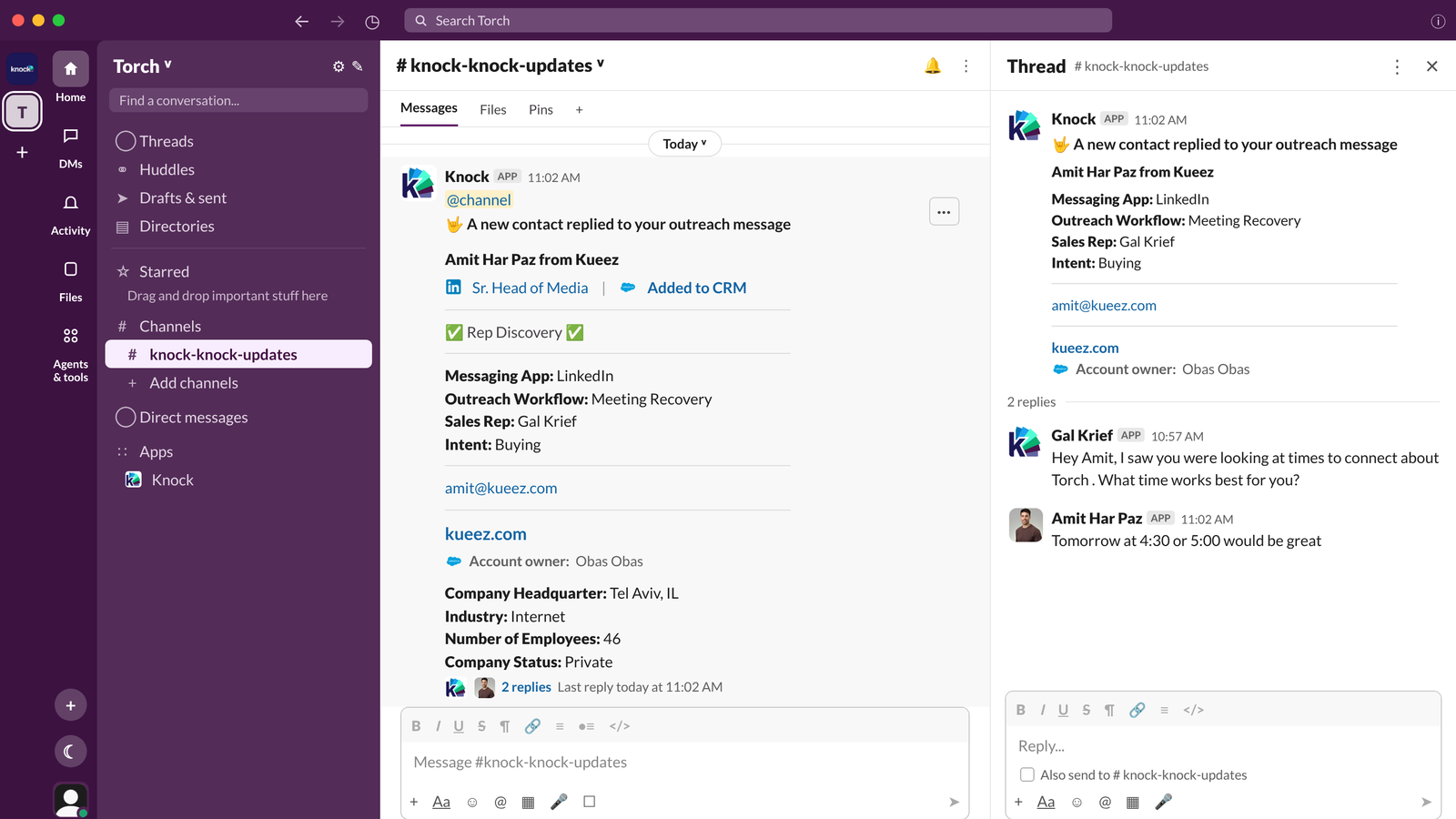
The rep answers from the thread, and the conversation continues on LinkedIn.